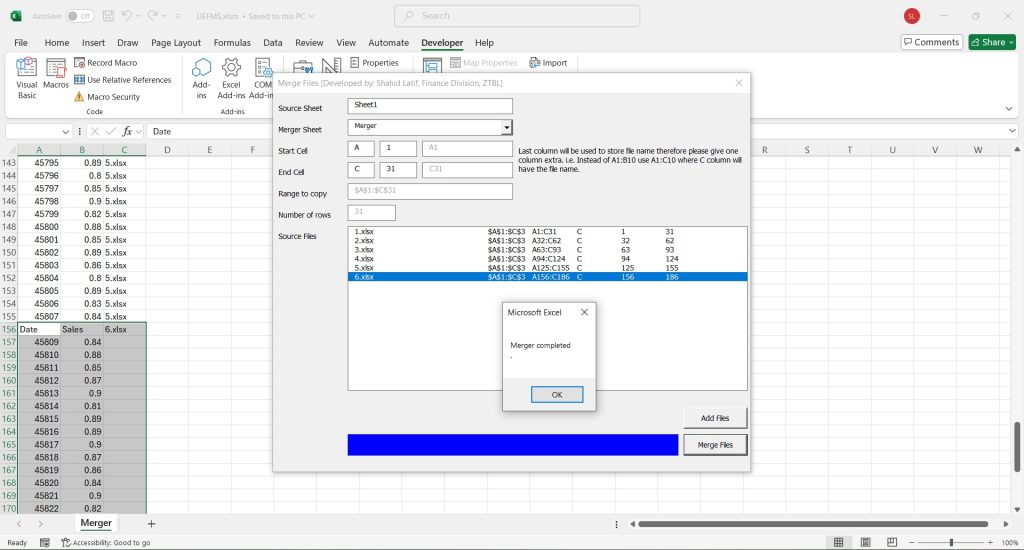

The VBA file is designed to merge data from multiple Excel workbooks into a single “master” workbook. The file is placed in a folder among other files that you intend to merge together. First all Excel files are identified in thate directory excluding the master itself. It then populates a list box with these file names and associated details, such as the source range within each file and the destination range in the master workbook where the data will be pasted. The destination ranges are dynamically calculated to ensure each file’s data is pasted sequentially without overwriting previous data.
The core merging logic then iterates through each file listed in list box. For each file, it opens the workbook, activates a specific worksheet and range (determined by user inputs), copies the data, and then pastes it as values into the active master workbook on a specified destination sheet and range. The code also writes the source filename into a designated column for each merged block of data.
This project was designed when data modeling and power query were not used. It helped me through a lot and it still does. I often encounter files which can not be accessed through power query, but they can be merged using this tool without any problem.