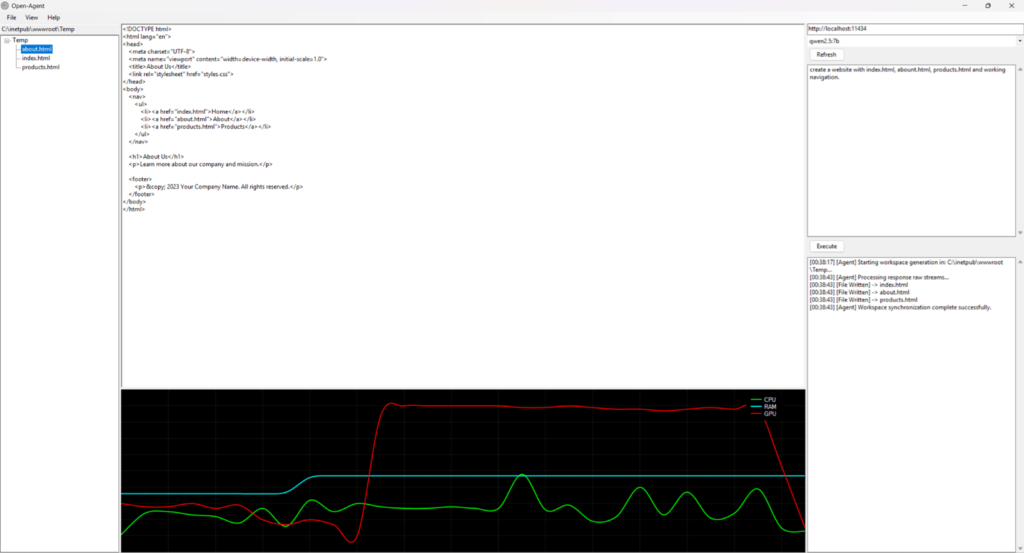

Open-Agent is a free .net based AI agent that runs on your computer and connects to your local ollama server and its models. Simply select a model, enter a prompt, and create whatever you want. Simply fire up you ollama server, and click on the refresh button.
Download: https://drive.google.com/file/d/1KYKGyNNtsGxxEKUGUCInYxBGCTiDmaUS/view?usp=sharing
As artificial intelligence continues to transform the software development landscape by automating tasks that once took months, many developers face significant barriers due to expensive subscription fees and restrictive usage quotas from commercial AI platforms. To bypass these limitations, the creator of this project built a lightweight, 3MB custom AI agent using Visual Studio and .NET. Designed to prioritize simplicity over the complex setups of existing free alternatives, this local application allows users to seamlessly connect to an AI server—such as a local Ollama server—by simply refreshing a model dropdown menu, selecting a dedicated workspace folder, and inputting a natural language prompt.
The application features a built-in hardware monitor to track real-time CPU, RAM, and GPU utilization, as local execution heavily draws on the host computer’s resources. In demonstrations, the agent successfully generated a functional PowerShell hardware-monitoring script and built a multi-page website featuring working navigation, custom styling, and scripts. However, running an AI agent entirely locally exposes clear hardware constraints; standard consumer graphics cards, like an RTX 4060 with 8GB of VRAM, struggle to hold context or run larger 16GB+ models, indicating that a more robust setup—such as dual GPUs or a high-end card like an RTX 5090—is required for scaling up to massive, complex multi-file projects.
AI #Coding #Programming #DotNet #Ollama #LocalAI #SoftwareDevelopment #AIAgent #VisualStudio #TechDIY #OpenSource #GPUMonitoring #WebDevelopment #PowerShell #IndieDev